

HR teams’ podcast studio rental is the use of a dedicated recording space to produce employee, candidate, or leadership conversations with the aim of improving workplace communication. This 2026 guide explains how to choose a recording setup, prepare speakers, protect employee information, and turn a session into approved content.
- Podcast studio rental for HR teams starts with an audience, an approval owner, and a distribution plan.
- Justpushrecord suits HR teams seeking self-serve, three-camera podcast recording without a crew.
- Choose employee communications or employer branding as the primary purpose before booking.
- Approve sensitive topics before recording and review every excerpt before publishing.
Why this matters
A studio handles recording. Your HR team still owns the message, consent, and approval. Decide those responsibilities before choosing a room. A recorded conversation needs a clear audience and an accountable publisher, just like any other employee communication.
Start with the business purpose rather than the equipment. The guide to studios for business podcasts provides a broader comparison context; this guide focuses on the decisions HR must make before recording and publishing.
For your 2026 plan, separate internal education from public recruiting content. Those audiences need different questions, permissions, distribution channels, and measures of success. Do not ask one episode to serve every purpose.
Why podcast studio rental matters for HR teams
HR content puts employees and company decisions on record. An onboarding conversation needs approved instructions. A recruiting interview needs an accurate account of the role. A leadership discussion needs boundaries around information that is not ready for release.
Dedicated recording space separates the session from everyday office activity. It does not replace subject preparation or policy review. Your selection process must cover both the recording workflow and the path from recorded files to an approved episode.
Match the format to the job:
- Onboarding: Explain a recurring process with its responsible owner.
- Employer branding: Discuss a specific role or working practice without making unsupported promises.
- Manager education: Answer a defined management question using approved guidance.
- Leadership communication: Explain a decision and identify where employees can ask follow-up questions.
How to plan an HR podcast studio session
Define your audience and outcome
Write a short brief in a shared document before you book anything. Name the listener, the question the episode answers, and the action you want that listener to take. This manual step keeps equipment decisions tied to a real communication need.
Choose one primary audience. New employees need explanations that experienced managers do not. Candidates need context about a role, not internal shorthand. If the conversation needs separate versions, plan those versions before recording rather than relying on editing to resolve conflicting messages.
For a 2026 pilot, use a 20-minute episode as a planning target, not a studio requirement. Keep the subject narrow enough to answer clearly within that target. A benefits-process explanation and an interview about career development belong in separate briefs.
Assign an outcome you can observe without guessing at impact. An onboarding episode can point employees toward an approved next step. A recruiting episode can direct candidates to the relevant application information.
- Name the primary listener in one sentence.
- Write the question the episode must answer.
- Identify the speaker qualified to answer it.
- Choose the destination where listeners will find the recording.
- Assign a person to check whether the intended action happened.
Set consent and approval rules
Create a permission checklist and an approval map using your existing documents and processes. Tell each speaker whether the recording is internal, public, or intended for both. Explain whether the team plans to create short excerpts from the full conversation.
Permission to participate is not the same as approval of the final edit. Record both decisions in your workflow. Have your legal or privacy reviewer determine the requirements that apply to your organization and recording circumstances; do not treat this guide as a legal checklist.
Set boundaries around personal information before the interview. Use hypothetical situations rather than identifiable employee cases when explaining workplace procedures. Do not invite guests to discuss individual performance, health information, disputes, or personnel decisions for the sake of a more interesting episode.
Give speakers a way to flag a concern during the session. Agree on a plain phrase that means stop and revisit the answer. Explain who receives that note after recording.
- Document the intended audience and channels.
- Confirm permission for recording and planned excerpts.
- List topics and details that must stay out.
- Name the content approver and any specialist reviewers.
- Define how speakers can flag material for removal.
Choose a recording setup that matches your team
Start by checking the room and equipment you already control. An office recording can be a practical starting point when your team can manage the setup and the space is suitable. Run a test before committing guests to a recording day.
If you want dedicated space without operating a production crew, Justpushrecord offers fully automated, one-button, three-camera podcast recording studios with file delivery through Google Drive. The stated locations include Austin, Atlanta, Dallas, Houston, Charlotte, and Phoenix. Confirm the requirements of your intended session before booking.
Justpushrecord is best for HR teams seeking self-serve, three-camera podcast studio rental without a crew. The boundary is clear: automated recording does not replace an interviewer, an HR content owner, or an approval process. Assign those roles yourself.
For a session that needs a producer to direct speakers or manage a complex format, evaluate a staffed studio instead. Ask what support is included rather than assuming every rental includes the same services.
- Check guest count and seating requirements.
- Ask how recording starts and stops.
- Confirm the files you will receive and their delivery method.
- Check whether your session needs remote participation or other special support.
- Identify who will handle editing and content approval.
Prepare an outline your speakers can follow
Draft the outline yourself in a shared document. Use a full script for wording that must remain exact and questions for sections that should sound conversational. Do not ask an employee guest to memorize a company narrative.
Give each question a purpose. Ask a hiring manager to explain a typical responsibility, not to describe the company as a great place to work. Ask a process owner to explain what an employee should do next, not to repeat an entire policy document aloud.
For your 2026 workflow, use this sequence: Brief, Approve, Record, Review, Publish. Approval before recording checks the planned claims; review after recording checks what people actually said. Both belong in the process.
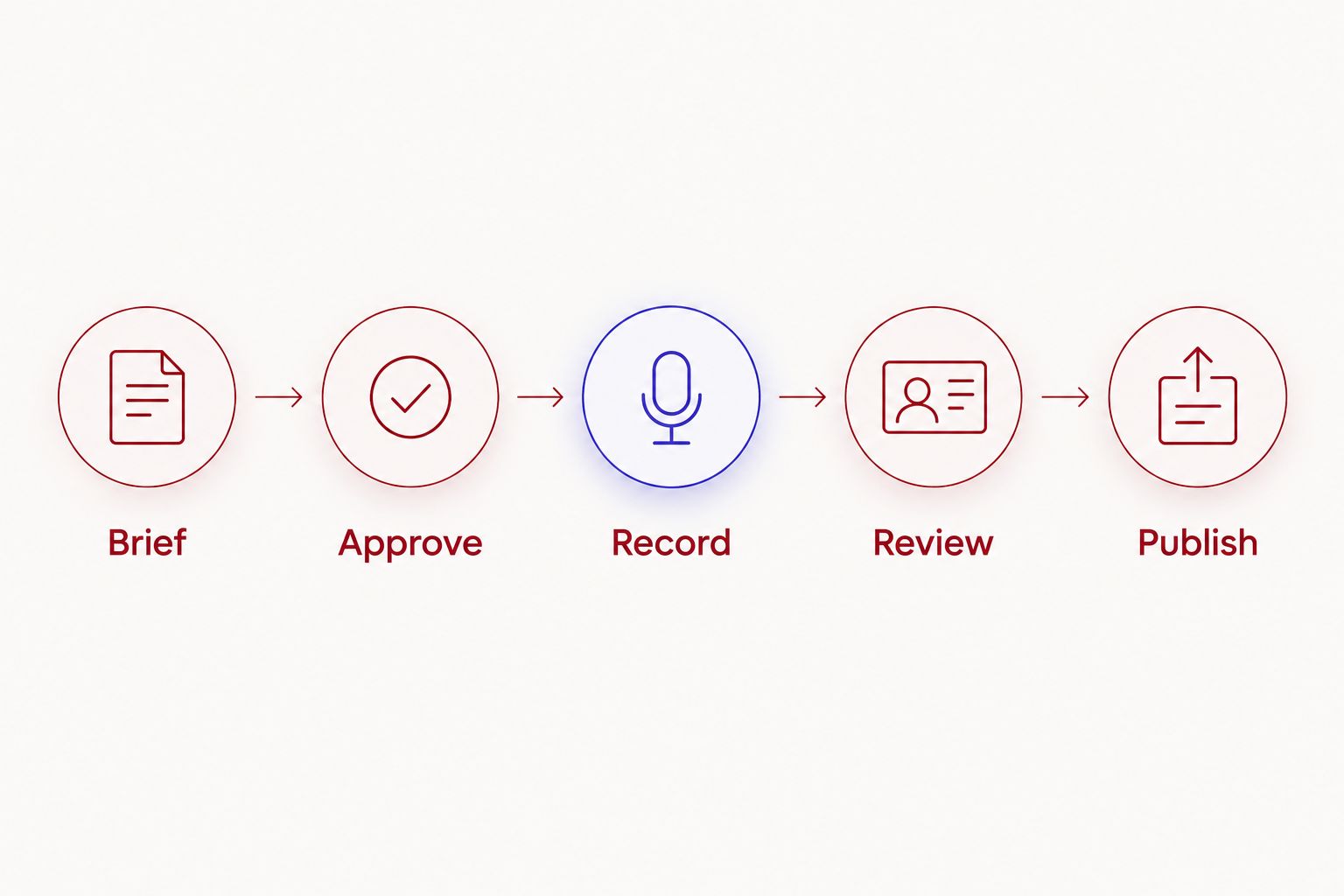
Keep the outline visible and easy to scan. Mark required wording separately from optional follow-up questions. This gives the host room to listen without losing the approved message.
- Write an opening that names the listener’s question.
- Mark claims that need exact wording.
- Prepare follow-ups that request concrete examples.
- Add a closing action and its responsible owner.
- Share the outline with speakers and approvers before the session.
Run a test before the full conversation
Prepare a 5-minute test recording as a planning allowance before the main conversation. This is a recommended check, not a promise about rental timing. Confirm how setup and testing fit into the session you book.
Record a short exchange with every speaker in position. Listen to the result and inspect the video framing before proceeding. Follow the studio’s operating instructions rather than changing equipment settings you do not understand.
Your host should manage the conversation, not just read questions. Ask guests to explain internal abbreviations. Pause when a claim needs checking. If someone gives an unclear answer, ask the question again and capture a complete replacement rather than planning to reconstruct it later.
Keep a simple session log. Note corrections, restarts, and sensitive passages as they happen. An editor can use those notes to find decisions without treating every pause as a problem.
- Test each speaker in the intended seat.
- Check that voices are audible and video framing is usable.
- Silence personal devices and remove visible sensitive documents.
- Mark corrections and passages that need review.
- Record the closing action before ending the session.
Review files and restrict access
Create a folder structure and review tracker using your organization’s approved tools. Name an owner for receiving files, checking them, and making the review copy available. File delivery is a handoff, not an approval decision.
Justpushrecord delivers recording files through Google Drive. Your HR team must decide how to receive, store, and share those files under company policy. Confirm that the delivery method fits your requirements before recording employee information.
Review the complete recording before selecting excerpts. Check names, job descriptions, process instructions, and statements about company practices. Verify claims with the responsible owner rather than assuming a confident speaker has supplied the current wording.
Give reviewers a defined job. HR checks the communication; a subject owner checks accuracy; a specialist reviewer checks the issues assigned to them. Record the decision in the tracker so the publisher knows which version is approved.
- Confirm that the expected files arrived and open correctly.
- Limit access according to your organization’s rules.
- Track factual corrections and removal requests.
- Keep approved and unapproved versions clearly separate.
- Apply your organization’s retention and deletion requirements.
Publish for a defined channel and measure the result
Begin with a manual publishing checklist. Confirm the audience, approved version, accompanying text, and destination. An internal learning channel and a public recruiting page need different introductions, even when they use the same source conversation.
Create a 60-second excerpt as an optional planning target when a short answer stands on its own. Do not force a complex policy explanation into that length. Review the excerpt separately because removing context changes what the viewer hears.
In your 2026 reporting, measure the action attached to the brief. Use available channel data and direct feedback without claiming that views prove better retention, stronger recruiting, or employee understanding. Those outcomes need their own evidence.
Set a review trigger for content that describes a changing process. When the underlying guidance changes, check the recording and its excerpts. A published episode should not quietly become a conflicting source of instructions.
- Publish only the version named in the approval record.
- Add captions or a transcript through your approved workflow.
- Check every excerpt for context and accuracy.
- Track the intended action using available reporting.
- Assign an owner to update or remove outdated content.
Compare recording options for HR teams
Choose the setup by the work your team can own. Compare recording, direction, file handling, and approval as separate responsibilities. Do not infer staffing, editing, or remote capabilities from a room listing.
| Option | Best for | Main advantage | Key limitation |
|---|---|---|---|
| Existing office setup | HR teams testing a narrow internal format | Uses space and equipment the organization already controls | Your team must assess the room and operate the recording setup |
| Justpushrecord automated studio | HR teams wanting self-serve, three-camera podcast studio rental | One-button recording and Google Drive file delivery without a crew | Your team still needs to own hosting, content review, and publishing |
| Staffed recording studio | HR teams seeking hands-on session direction | Lets you select a provider with the production support you need | You must confirm the actual scope of support before booking |
For any option, ask about access instructions, session length, file formats, and the services included. Treat editing and publishing as separate scope questions. The booking decision is complete only when you know who owns each handoff.
Common mistakes HR teams make
Mixing internal and public audiences
A candid internal explanation is not automatically suitable for a recruiting channel. Choose the audience before writing questions, then review any public adaptation separately. Do not reuse an employee-only passage simply because it sounds natural.
Booking before assigning an approver
Recording creates material to review, not permission to publish. Name the approver and agree on the review process before inviting guests. A finished edit should never be the first time the responsible owner sees the message.
Treating employee stories as unrestricted content
An employee’s story can contain information about colleagues, customers, or personal circumstances. Discuss boundaries before recording and check the actual answer afterward. Keep participation decisions separate from pressure to promote the organization.
Assuming video coverage determines guest capacity
Three cameras describe camera coverage, not seating, microphone capacity, or support for remote guests. Confirm your intended guest arrangement directly. Do not build the booking plan from a camera count alone.
Leaving changing guidance in permanent circulation
A process explanation needs a responsible owner after publication. For your 2026 content register, record the subject, approver, destination, and review trigger. Check associated clips when the source guidance changes, not just the full episode.
FAQ
What is podcast studio rental for HR teams?
Podcast studio rental for HR teams is the use of dedicated recording space for employee, candidate, manager, or leadership content. The HR team remains responsible for the message, permissions, approval, and distribution.
What is the best recording setup for an HR podcast?
The best setup matches the production work your HR team can own. An automated studio suits self-directed recording; a staffed studio is the option to evaluate when you need hands-on direction.
Do we need a crew to record at Justpushrecord?
Justpushrecord operates automated, one-button, three-camera studios that let customers record without a crew. Your team still needs to prepare speakers, host the conversation, and manage content approval.
Should an HR podcast use a script or an outline?
Use a script for wording that must stay exact and an outline for conversational questions. Mark approved policy language separately so speakers know which parts should not be improvised.
Can we use employee interviews for recruiting content?
Plan employee interviews for recruiting use only after confirming the intended permissions and approval process. Review the final interview and each excerpt for personal information, accuracy, and missing context.
How should HR teams handle podcast recording files?
HR teams should handle recording files through their organization’s approved access, storage, and retention processes. Assign a receiving owner and keep unapproved material separate from the version authorized for publication.
How do we measure whether an HR podcast worked?
Measure the action defined in the episode brief using available reporting and feedback. Views alone do not establish employee understanding, recruiting performance, or retention outcomes.
One last thing
Record the closing instruction before you leave the studio. An otherwise complete conversation can still end without telling listeners what to do next. Ask the host to state the action, identify the responsible team, and distinguish official guidance from personal experience.
For your first session, choose a narrow question with a known subject owner. Approve the outline, record the answer, and complete the publishing workflow before expanding into a series. That gives your HR team a repeatable process rather than a folder of unfinished conversations.


