Podcast editing time depends on the recorded material, the changes you want, and the files you need to publish; episode length alone does not give you a reliable estimate. Count file preparation, editing, a complete playback check, exports, and revisions separately, then distinguish that work from the calendar time until delivery.
- How long does it take to edit a podcast episode? Estimate the edit scope, review, exports, and revisions separately.
- A basic cleanup and a rebuilt interview are different jobs, even when their finished episodes have identical runtimes.
- Justpushrecord provides one-button, three-camera podcast recording; define your post-production requirements separately.
- Measure your own editing workflow before committing to a recurring publishing deadline.
Why this matters
Editing time and delivery time are not the same thing. Editing time measures work. Delivery time also includes file transfers, scheduling, feedback, and approval. A publishing deadline needs both.
Keep recording separate, too. The guide to how long it takes to record a podcast episode covers the session itself. This page covers what happens after you stop recording.
For your 2026 production calendar, assign an owner to each stage. Otherwise, a finished edit can sit unpublished while everyone assumes someone else is checking it.
How long does it take to edit a podcast episode?
Estimate podcast editing time from the actual tasks, not a universal multiplier. A clean conversation that needs trimming is a different assignment from an interview that needs restructuring, audio repair, camera selection, captions, and clips.
Use this sequence to build an estimate you can check:
- Inspect the recording. Listen to representative sections and check the beginning, middle, and end. Identify missing material, distracting sounds, repeated answers, and incomplete takes.
- Define the edit. Decide whether you want technical cleanup, conversational tightening, or structural changes. Write down what must stay.
- List the deliverables. Separate the full audio episode, full video episode, captions, and promotional clips. Do not treat them as interchangeable exports.
- Estimate each task. Give file preparation, content editing, sound work, video work, review, and delivery their own entries.
- Record actual time. Compare the completed job with your estimate. Use the difference to improve the next episode's plan.
A useful estimate states its assumptions. “Clean up the interview” leaves too much undecided. “Remove abandoned takes, preserve natural pauses, add the supplied introduction, and deliver the approved full episode” gives the editor a defined job.
Your own completed episodes are the strongest basis for your next estimate. Track episodes by format so a straightforward solo recording does not become the benchmark for a heavily edited guest interview.
Basic cleanup: preserve the conversation
Best for: a complete conversation whose order and substance already work. Basic cleanup focuses on technical distractions and obvious mistakes without rewriting the episode through cuts.
Specify what cleanup means. It can include trimming the start and end, removing an abandoned take, adjusting uneven speech levels, and adding supplied opening or closing material. Each task still needs a decision about how much intervention is appropriate.
The advantage is a contained assignment. The limitation is equally clear: technical cleanup does not fix an unclear argument, a missing explanation, or an interview that starts with the wrong subject.
Tell the editor which natural speech patterns to preserve. Removing every hesitation is not the same goal as removing distractions, and it creates a different editing brief.
Content editing: tighten or rebuild the episode
Best for: recordings that need clearer answers, fewer repetitions, or a different sequence. Content editing changes what the audience hears and when they hear it.
The editor must judge meaning as well as sound. Moving an answer requires checking the surrounding question, references to earlier discussion, and the transition into the next section. A clean cut is not enough if the resulting conversation stops making sense.
The benefit is editorial control. The trade-off is more decision-making and a greater need for host approval, particularly when cuts change emphasis.
Mark material that must remain before work begins. For a business interview, that includes approved wording, essential qualifications, and statements that need review by the person responsible for accuracy.
Video editing: define more than the camera count
Best for: episodes where viewers need a deliberate visual edit alongside the conversation. Video adds decisions about framing, speaker changes, titles, and the relationship between sound and picture.
A three-camera recording supplies multiple viewpoints. It does not, by itself, define how often the finished video should switch views or whether the editor should create captions and promotional versions.
At Justpushrecord, the podcast recording setup uses three cameras, one-button operation, and Google Drive file delivery without a crew. Justpushrecord is best for podcast hosts, creators, and businesses seeking self-serve, three-camera recording without a crew. The recording format does not replace an editing brief; confirm the required post-production work separately.
Before editing starts, establish the main viewing format. Ask for the full episode and any shorter versions as distinct deliverables, each with its own review requirements.
Which editing scope fits your episode?
| Editing scope | Best for | Main benefit | Limitation |
|---|---|---|---|
| Basic cleanup | A conversation that already works | Preserves the original flow while addressing distractions | Does not resolve weak structure or missing explanations |
| Content editing | Repetitive or poorly ordered material | Gives you control over sequence and emphasis | Requires editorial decisions and careful approval |
| Video editing | A watchable full episode with deliberate visual choices | Coordinates picture with the conversation | Adds visual checks and version-specific work |
These scopes overlap. A video episode can also need structural editing, so do not assume the table describes mutually exclusive packages.
Why podcast editing time varies
The work changes with the recording and the brief. Use these factors when comparing estimates for your 2026 schedule:
- Source material. Extra takes, interruptions, overlapping speech, and distracting sounds create different tasks from a continuous, intelligible recording.
- Editorial changes. Trimming the ends preserves the structure. Reordering answers requires checking context and transitions throughout the episode.
- Deliverables. An audio episode, a video episode, captions, and promotional clips each need their own preparation and checks.
- Visual decisions. Camera selection, graphics, and reframing add work beyond the spoken conversation.
- Approval process. Conflicting feedback and new instructions reopen decisions that appeared settled. Name a final approver before editing begins.
- Editor familiarity. An editor who has your approved examples and written rules starts with clearer direction than an editor receiving an unexplained folder of recordings.
Ask which factors an estimate includes. A shorter estimate is not useful if it leaves out the work required to publish.
Build an editing workflow you can measure
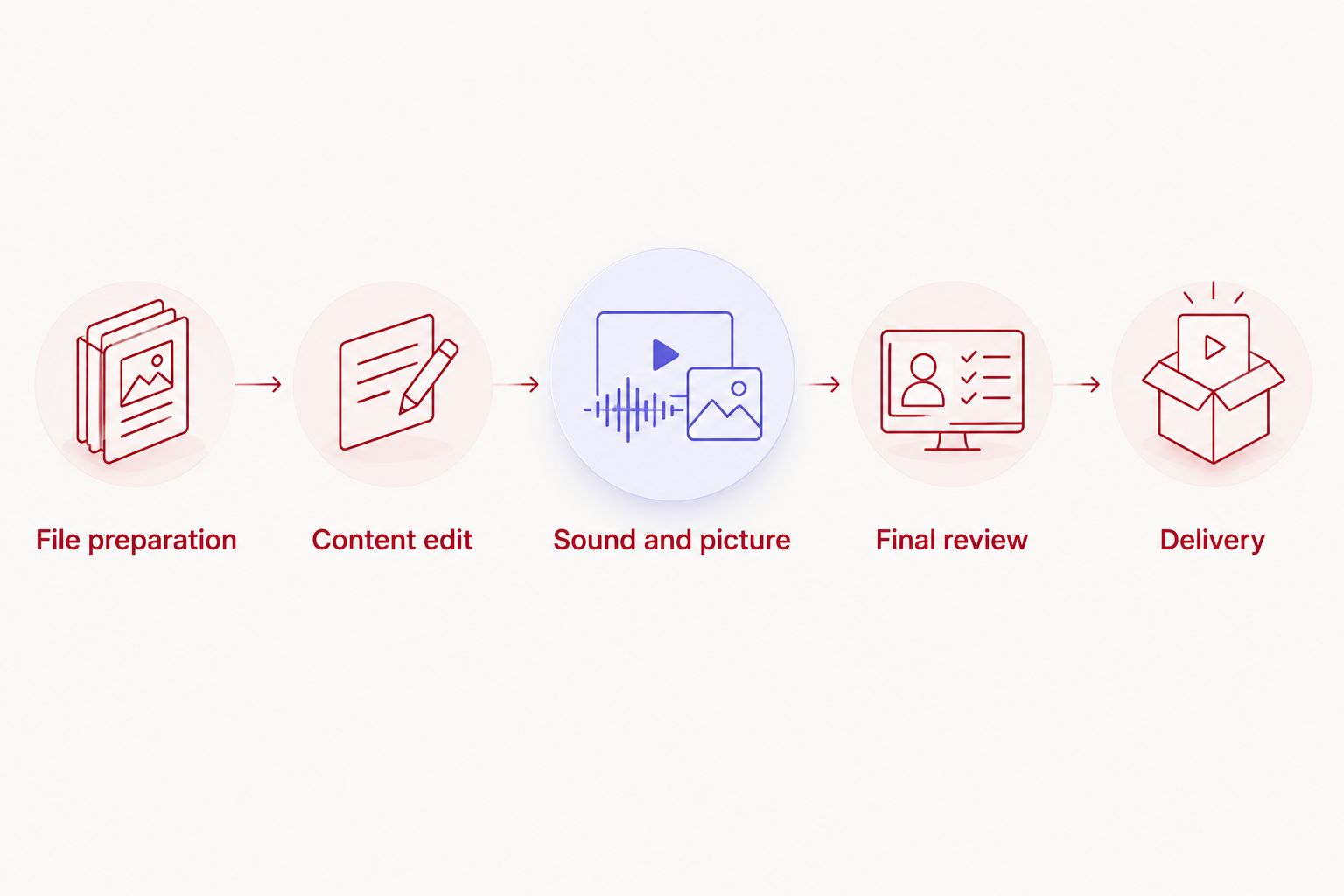
Use the same stage names in your 2026 production tracker. Consistent labels make delays visible without requiring a complicated production system.
File preparation
Collect the recordings, supplied music, opening material, and editorial notes. Confirm that the files open and that the expected conversation is present before detailed editing begins.
Google Drive delivery is part of Justpushrecord's podcast recording workflow. File access and editorial approval are separate steps; identify who receives the files and who authorizes the finished episode.
Content edit
Resolve the episode's order and substance before polishing details. Remove unwanted takes and settle major cuts while changes are still straightforward to review.
Keep a clear record of questions for the host. Do not bury an unresolved editorial choice inside an otherwise finished export.
Sound and picture
After the content is settled, address sound consistency and the planned visual treatment. For video, check that the selected picture matches the conversation and that cuts do not create distracting discontinuities.
Apply only the treatments the brief requires. Adding unrequested graphics or versions changes the job rather than completing it.
Final review
Review the complete export, not just the editing timeline. Check the opening, ending, transitions, spelling, and any sections changed during approval.
A full playback at normal speed takes the runtime of the finished episode. That is a review requirement, not an estimate of the entire edit.
Delivery
Label approved files clearly and separate them from drafts. Confirm that the person publishing the episode has the right version and the information needed to use it.
Delivery is complete when the agreed files are accessible. Publishing remains a separate responsibility unless your brief assigns it to the editor.
How do you reduce podcast editing time?
Define what to remove before the editor opens the project. A clear brief prevents the editor from guessing whether you want a natural conversation, tightly condensed answers, or a substantial rewrite.
During recording, finish a thought before restarting it. If you replace an answer, make the preferred take clear in your notes. That gives the editor a decision rather than an unexplained repetition.
After recording, send consolidated instructions. Timestamps, the requested change, and the reason for it are more useful than general comments about pace or energy.
Use an approved episode as a reference for recurring choices. Specify how you handle introductions, interruptions, natural pauses, titles, and endings. Keep that reference current when the show's format changes.
Does automated recording mean the episode is edited?
Automated recording and editorial judgment are different functions. A system can simplify capturing the session without deciding which answer belongs in the finished episode.
Justpushrecord's one-button podcast recording model removes the need for a crew during recording. You still need to define the finished episode, required versions, and approval process.
Before booking, confirm what recording delivery includes and what remains your responsibility. Do not infer a finished edit, captions, clips, or a delivery deadline from the phrase “automated studio.”
How do you set a realistic editing deadline?
Start with the publication date and work backward through approval, review, editing, and file access. Assign a deadline to each handoff, not just the final export.
For your 2026 schedule, separate active work from waiting. If the editor finishes a draft but the host has not approved it, the problem is an approval delay rather than unfinished editing.
Settle how feedback will arrive. Use one consolidated set of notes and identify the person who can resolve conflicting requests. If the brief changes after editing begins, update the delivery plan instead of keeping an obsolete deadline.
FAQ
How long does it take to edit a podcast episode?
Podcast editing time depends on the source recording, editorial changes, deliverables, and review requirements. Estimate file preparation, editing, full playback, exports, and revisions separately rather than applying a universal runtime multiplier.
Does a longer podcast always take longer to edit?
A longer podcast requires more time for a complete normal-speed playback, but runtime alone does not determine the total editing workload. Structural changes, audio problems, and additional deliverables also affect the work.
Is editing a video podcast the same as editing an audio podcast?
Video podcast editing includes picture decisions that an audio-only edit does not require. Define camera selection, titles, captions, and promotional versions separately from the sound edit.
Does a three-camera recording arrive as a finished podcast?
Three cameras describe the recording setup, not the finished editing deliverables. Confirm which files you receive and whether editing, review, captions, or clips are included in your arrangement.
What should I send a podcast editor before work starts?
Send the source recordings, required deliverables, editorial instructions, supplied assets, and the name of the final approver. Add timestamps for known mistakes and identify material that must remain.
What is the difference between editing time and turnaround time?
Editing time measures the work performed on the episode; turnaround time measures the elapsed period until delivery. Turnaround also includes scheduling, transfers, feedback, and approval.
Should I check the exported podcast before publishing?
Yes, review the complete exported podcast before publishing. Check that the approved changes, opening, ending, sound, and picture are present in the actual delivery file.
One last thing
Time the handoffs, not just the editor. For your next 2026 episode, record when the files become accessible, when the draft is ready, when feedback arrives, and when approval is complete.
That record tells you whether to simplify the edit or fix the approval process. Those are different problems. Give each a different solution.