
Launch A Show can be the right choice when its workflow fits your show. If you need a verified one-button, three-camera studio without a crew, that fit has a clear limit to check. The best Launch A Show alternative in 2026 is JPR Studios if you want an automated studio session; a self-managed home setup is better if you need to record without traveling.
- For launch a show alternatives in 2026, choose JPR Studios for one-button, three-camera recording without a crew.
- Choose a self-managed home setup when avoiding travel matters more than using a studio.
- Choose staffed production when you want a person to run the recording instead of operating the session yourself.
- Ask Launch A Show how recording starts, what support is included, and how files are delivered before switching.
Why this matters
A studio choice changes what you do on recording day. In an automated room, you need to know how to start the session and where the files go. In a self-managed setup, you control the space and the recording workflow. With staffed production, another person operates the session. Those are different jobs, even if the finished episode serves the same audience.
JPR Studios is a podcast studio option for hosts, creators, and businesses that want to record without a crew. Its stated workflow uses one button, three cameras, and Google Drive file delivery. Those details are useful because they answer practical questions before you book. They do not tell you whether a particular room, time, or format fits your episode. Check those details for the session you intend to record.
Launch A Show alternatives at a glance
| Option | Best for | Standout workflow | How it differs from Launch A Show |
|---|---|---|---|
| Launch A Show | People whose existing workflow meets their recording needs | Confirm its current recording and delivery process directly | The reference option; check its terms against the requirements below |
| JPR Studios | In-person recording without a crew | One-button operation, three cameras, Google Drive delivery | Offers a stated automated workflow you can compare with Launch A Show |
| Self-managed home setup | Recording without a trip to a studio | You manage your own space and recording process | Moves setup and file management into your hands |
| Staffed production | Sessions that need someone to operate the recording | A person runs the production process | Adds human production work rather than a self-serve session |
This is a workflow comparison, not a claim that Launch A Show lacks any listed feature. Confirm its current setup with Launch A Show. Then compare the answer with what your next episode requires.
1. JPR Studios: best for an automated studio session
Best for: A podcast host, creator, or business that wants to record in person without bringing a crew. JPR Studios operates automated, one-button, three-camera podcast studios. The stated file-delivery method is Google Drive. That gives you a defined path from entering a studio to receiving recording files, without making you responsible for running a staffed production team.
Where JPR Studios shines
- A simple start: The recording setup is described as one-button operation. You do not need to make camera switching the host's job.
- Video capture: Three cameras give you a stated video-recording setup to plan around when your show includes a host and guests.
- No crew required: The studio model is self-serve. You can plan a session without assembling a production crew.
- A named delivery method: Files are delivered through Google Drive. Know which account should receive access before the session.
Where JPR Studios falls short
- You must travel to a studio. A home setup is a better fit when travel is the obstacle.
- A self-serve session is not the same as having a person operate the room for you. Choose staffed production if that person is essential.
- Three cameras describe the setup, not whether your specific guest arrangement or recording plan will work. Confirm the room and session details before booking.
| Decision point | JPR Studios | Launch A Show |
|---|---|---|
| Starting the recording | Stated one-button workflow | Confirm the current workflow directly |
| Video setup | Stated three-camera setup | Confirm the setup for your session |
| Crew requirement | Designed for recording without a crew | Confirm what support is included |
| File delivery | Stated Google Drive delivery | Confirm the delivery method and access process |
Verdict: Book JPR Studios when its location and self-serve format match the episode you have planned. Do not choose it solely because three cameras sound useful. Decide first whether you will publish video, who will appear on camera, and who needs the files afterward.
2. Self-managed home setup: best for recording without travel
Best for: A host who needs to record where they already are and is willing to manage the recording process. A self-managed home setup is a working method, not a named studio or a promise about equipment. You decide how to capture audio or video, check that the recording worked, and keep track of the files.
Where a home setup shines
- No studio trip: You record at the location you control.
- Direct control: You choose when to set up, test, pause, and repeat a take.
- Familiar space: You can rehearse the same workflow before a guest joins.
Where a home setup falls short
- You own the setup and file checks. Nobody else has accepted those tasks for you.
- A guest's location and equipment become part of your plan when the guest is not in the room.
- A home room does not become a three-camera studio by default. Treat camera coverage as a separate decision.
| Decision point | Self-managed home setup | Launch A Show |
|---|---|---|
| Travel | No studio trip required | Confirm where your session takes place |
| Recording operation | You manage it | Confirm who operates the session |
| File handling | You establish the process | Confirm how files are delivered |
Verdict: Choose the home setup if recording at your location is the deciding requirement. If the setup work repeatedly delays your show, compare the work you do at home with the one-button studio workflow instead of comparing rooms by appearance.
3. Staffed production: best for hands-on operation
Best for: A host or business that needs a person to manage the recording session. Staffed production describes a service model, not a specific provider. Define the work you need that person to do before evaluating any offer.
Where staffed production shines
- A person can take responsibility for operating the session rather than leaving that task with the host.
- You can ask for a clear division of duties before recording: who prepares the room, starts capture, checks files, and handles changes during the session.
- It fits a recording plan that depends on active production decisions while the host concentrates on the conversation.
Where staffed production falls short
- It does not remove the need for a plan. The operator still needs to know your format, participants, and intended deliverables.
- The scope varies by provider. Do not assume that recording, editing, and publishing are the same assignment.
- It adds a person to the session. That is unnecessary when you specifically want to record without a crew.
| Decision point | Staffed production | Launch A Show |
|---|---|---|
| Session operation | A person runs the agreed production work | Confirm who runs the session |
| Scope | Defined with the provider | Confirm what work is included |
| Host responsibility | Depends on the agreed division of duties | Confirm what you must handle |
Verdict: Choose staffed production when an operator is a requirement, not an assumption. If all you need is a place to record a prepared conversation, first decide whether a self-serve session covers that job.
How to choose before you book
Start with the episode, not the studio. Write down who will attend, whether you need video, and who must receive the files. A solo conversation, an in-person guest interview, and a session with remote participants pose different setup questions. The right alternative is the one whose stated workflow answers your questions without assigning unexpected work to the host.
Use this short decision sequence in 2026:
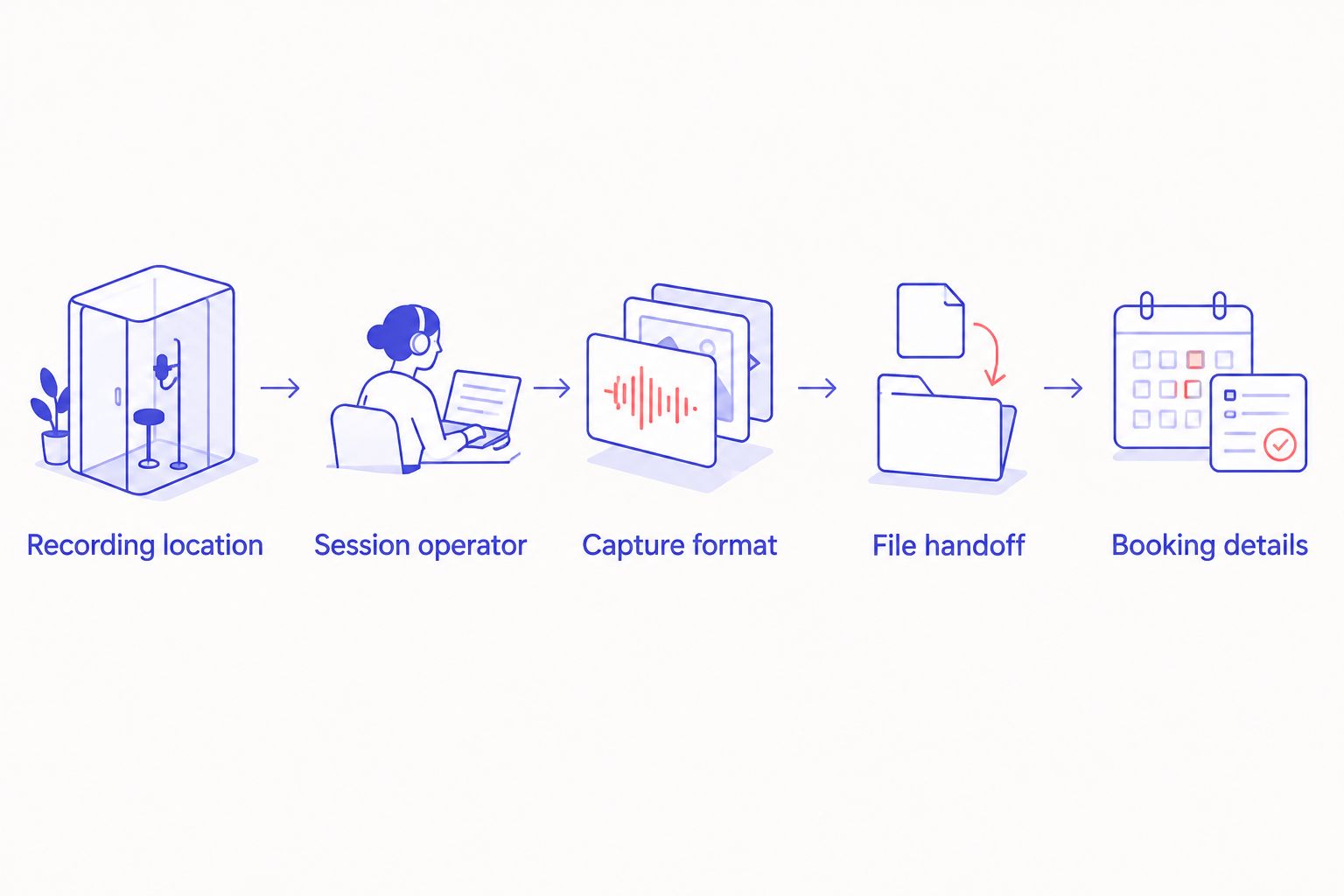
- Choose the recording location. If you cannot travel, start with a self-managed setup. If you want an in-person studio, confirm the city and the room before planning the guest's trip.
- Choose who operates the session. If you want to start it yourself without a crew, compare automated studios. If you need someone present to run production, ask for staffed service.
- Choose the capture format. Decide whether audio alone meets the publishing plan or whether you need video. For video, confirm the camera arrangement against the number of people appearing.
- Choose the file handoff. Name the person who will receive the recordings and the person who will edit or publish them. Confirm the delivery method before recording.
- Confirm the booking details. Check the selected location, session format, guest needs, and current terms with the provider you intend to use.
For JPR Studios, the known cities include Austin, Atlanta, Dallas, Houston, Charlotte, and Phoenix. That list helps narrow the location question. It does not establish that a particular room or session time is available. Confirm the location that fits your guests before making the studio the center of your production plan.
Plan your studio session
Check the location and recording workflow against your episode plan.
Why people switch from Launch A Show
Switch because you have a requirement that another workflow answers more clearly, not because an alternatives list tells you to. In 2026, the useful question is whether Launch A Show's current process matches your next recording. Ask it directly; do not infer a missing feature from this comparison.
An automated studio is the clearer choice when your requirements are an in-person room, one-button operation, three-camera capture, and file delivery through Google Drive. JPR Studios states that combination. A home setup is the clearer choice when you need to stay where you are and can manage recording and files yourself. Staffed production is the clearer choice when you need a person to operate the session.
Make the comparison on the same episode. Give each option the same participants, format, and file-handoff requirement. Then ask who starts recording, who responds if the plan changes, and how you get the files. If those answers meet your needs at Launch A Show, switching adds work without solving a defined problem.
When staying with Launch A Show is the right call
Stay with Launch A Show if its current workflow already fits your episode and you have confirmed the details that matter. Familiarity is useful when it means you can record without revisiting setup decisions. There is no reason to replace a working process just to use a different studio model.
For a 2026 booking, confirm the room, recording responsibilities, capture format, and file handoff directly with Launch A Show. Apply the same check to every alternative. A published description can tell you how a service is positioned; your booking confirmation must tell you what will happen in your session.
FAQ
What's the best Launch A Show alternative in 2026 for recording without a crew?
JPR Studios is the best fit here for an in-person, self-serve session because its stated workflow uses one button and three cameras without a crew. Confirm the location and session details before booking.
Is JPR Studios better than Launch A Show for a video podcast?
JPR Studios is the clearer documented choice when a stated three-camera, one-button setup is your requirement. Confirm Launch A Show's current camera arrangement before deciding between them.
Can I record at home instead of using Launch A Show?
Yes, a self-managed home setup lets you record without traveling to a studio. You must manage the setup, recording checks, and file process yourself.
When should I choose staffed production over an automated studio?
Choose staffed production when you need a person to operate the recording session. Define that person's duties with the provider before you book.
How does JPR Studios deliver recording files?
JPR Studios states that recording files are delivered through Google Drive. Decide who needs access and confirm the handoff details for your session.
Where can I record with JPR Studios?
JPR Studios operates in cities that include Austin, Atlanta, Dallas, Houston, Charlotte, and Phoenix. Confirm the location and room that fit your recording plan.
What should I ask Launch A Show before switching?
Ask who starts and operates the recording, what capture format your session includes, and how files are delivered. Compare those answers with the work you want to handle yourself.
One last thing
Assign an owner for the files before recording. A successful session still creates a handoff: someone must receive the files and move the episode toward editing or publishing. In 2026, that decision is as practical as choosing the room. If the person responsible for the next step cannot access the recording, the studio choice has not finished the job.


