
Keep Pro Studio Time if its recording setup already meets your needs. The reason to look elsewhere is a different production workflow, not a different studio name. The best Pro Studio Time alternative in 2026 is Justpushrecord for automated, three-camera podcast recording without a crew; remote recording is the better route when guests cannot meet in person.
- For pro studio time alternatives, Justpushrecord fits hosts who want one-button, three-camera podcast recording without a crew.
- Choose a staffed podcast studio when your brief requires an operator during recording.
- Choose remote recording when hosts and guests need to participate from different locations.
- Keep Pro Studio Time when its confirmed recording workflow already fits your show.
Why this matters
A podcast studio is part of your production process. The right choice depends on who operates the recording, where guests participate, and what files you need afterward. Start with those decisions before comparing rooms.
Justpushrecord offers automated podcast studio rentals with three cameras, one-button recording, and file delivery through Google Drive. That is a specific fit: hosts, creators, and businesses who want to record without a crew. It is not the same brief as hiring someone to direct a session.
For your 2026 shortlist, separate recording from everything that follows. Getting files is one step. Editing, reviewing, publishing, and distributing an episode are separate tasks that need clear ownership.
Pro Studio Time alternatives at a glance
Use this table to select a recording model. The Pro Studio Time row is your benchmark: judge it against the details confirmed for your own booking rather than assumptions about its service.
| Option | Best for | Defining feature or decision | How to compare with Pro Studio Time |
|---|---|---|---|
| Pro Studio Time | Keeping a recording arrangement that meets your brief | Your confirmed session scope | Check whether its workflow already satisfies your requirements |
| Justpushrecord | In-person video podcast recording without a crew | Automated, one-button recording with three cameras and Google Drive delivery | Compare who operates the session and how files are delivered |
| Staffed podcast studio | Sessions that require an operator | People assigned to recording tasks | Compare the specific responsibilities included in each booking |
| Remote recording | Hosts and guests in different locations | Participants record without sharing a room | Compare guest access, recording procedure, and file handling |
| Home recording setup | Creators who want to operate their own recording space | You manage the room, equipment, and recording process | Compare the work you retain with the work a studio handles |
Choose the workflow first. Choose the provider second. A room that looks right still needs to support the way you intend to record.
1. Justpushrecord: best for recording without a crew
Justpushrecord is an automated podcast studio rental service for hosts, creators, and businesses. Its recording model uses three cameras and one button. Files are delivered through Google Drive.
Best for: An in-person podcast session where you want a defined recording setup without bringing a production crew.
Where the automated studio model shines
- Simple operation: One-button recording reduces the recording controls you need to manage.
- Video recording: Three cameras are part of the stated studio model.
- Clear file destination: Google Drive is the stated delivery method.
- In-person conversation: Hosts and guests can record together in a studio rather than organize a remote session.
- Named city options: The description includes Austin, Atlanta, Dallas, Houston, Charlotte, and Phoenix.
Those six named cities give you a location shortlist. Check the specific location before coordinating guests. Do not treat a city name as confirmation that a particular date or session format is available.
Where the automated studio model falls short
- It is self-serve: Choose a staffed recording service if your brief requires a dedicated operator.
- Preparation stays with you: An automated recording system does not decide your episode structure, questions, or talking points.
- File delivery is not a publishing plan: Assign responsibility for editing, approval, and release.
- Guests still need to attend: A physical studio does not solve a geographically distributed interview by itself.
These are workflow boundaries, not reasons to avoid automation. They matter when you expect the booking to cover more than recording.
Head-to-head booking checklist
| Dimension | Automated studio model | What to confirm with Pro Studio Time |
|---|---|---|
| Operation | One-button, self-serve recording | Who operates the session? |
| Cameras | Three-camera recording | What camera setup is included? |
| File delivery | Google Drive | Where and how are files delivered? |
| Production roles | Recording without a crew | Which people and responsibilities are included? |
For a 2026 business podcast, make the handoff explicit. Name the person who receives the files and the person who approves the episode. The recording can be simple while the approval process remains demanding.
Verdict: Choose this model when self-serve, three-camera recording matches your brief. Skip it when an operator is a requirement.
Check your studio options
Review the one-button, three-camera recording model before planning your session.
2. Staffed podcast studio: best for operator-led sessions
Choose a staffed podcast studio when you want someone assigned to recording tasks during the session. Specify the role. Operating equipment, directing a conversation, and producing an episode are different responsibilities.
Best for: A recording brief that requires hands-on production support rather than self-serve operation.
Where a staffed studio shines
- You can assign technical recording responsibilities to a named operator.
- You can discuss the recording brief with the person responsible for executing it.
- You can define support around your session instead of assuming every host wants the same level of involvement.
Where a staffed studio falls short
- You need to coordinate both the room and the assigned people.
- The word staffed does not explain what each person will do.
- A recording operator does not automatically replace an editor, interviewer, or producer.
Ask for a task-level scope. Who starts the recording? Who checks the audio? Who decides when a take needs repeating? Who receives the files afterward?
Compare those answers with Pro Studio Time's confirmed session scope. If both options cover your required tasks, judge them on practical fit rather than the presence of staff alone.
Verdict: Choose a staffed studio when you need an operator. Skip the extra coordination when you only need self-serve recording.
3. Remote recording: best for guests in different locations
Remote recording changes the location requirement. Hosts and guests participate without sitting in the same studio. That makes it a different production model, not a direct replacement for an in-person room.
Best for: Interviews where bringing everyone to the same location is not part of the plan.
Where remote recording shines
- Guests can participate from their own locations.
- You do not need a shared studio for the conversation.
- You can design the session around distributed participants from the start.
Where remote recording falls short
- Each participant needs to prepare their own recording environment.
- You need a clear procedure for joining, testing, recording, and handing off files.
- Remote participation does not reproduce the experience of sharing a physical room.
For remote interviews in 2026, send guests practical instructions. Explain where to sit, how to reduce interruptions, and what equipment the chosen workflow requires. Confirm the recording procedure before the interview begins.
Compare remote recording with Pro Studio Time on the question that matters most: do your guests need a shared room? If the answer is no, location flexibility belongs ahead of studio amenities in your decision.
Verdict: Choose remote recording for distributed guests. Skip it when an in-person conversation is central to the format.
4. Home recording setup: best for running your own space
A home recording setup puts the recording process under your control. You choose the room, arrange the equipment, and maintain the workflow. You also keep the responsibility for making that workflow work.
Best for: Creators who want to operate their own recording environment and accept the setup work.
Where a home setup shines
- You control how the recording space is arranged.
- You can keep your own equipment and recording procedure together.
- You can build the environment around your recurring format.
Where a home setup falls short
- You must manage room noise, equipment placement, and recording checks.
- Guest logistics remain your responsibility.
- You own troubleshooting and file management.
Compare this option with Pro Studio Time by listing the tasks a studio booking would remove from your workload. Then decide which tasks you actually want to own. Control is useful only when you want the responsibility that comes with it.
Verdict: Choose a home setup when operating the space is part of your plan. Skip it when you want to avoid equipment and room management.
Why people switch from Pro Studio Time
A switch makes sense when your requirements change. That is not a claim that Pro Studio Time lacks a particular service. It is a reason to compare the confirmed booking scope with your next recording brief.
Use these decision points:
- You want self-serve operation. Compare the steps required to begin and finish recording.
- You need an operator. Identify the technical tasks that someone else must handle.
- Your guests are distributed. Decide whether bringing them together is necessary.
- You want to own the recording space. Separate the appeal of control from the work of maintaining it.
- Your file handoff needs clarity. Confirm delivery, access, and responsibility for the next production stage.
For your 2026 comparison, write one sentence that explains the change: We need to record without a crew, or Our guests will participate remotely. That sentence should explain your shortlist.
If you cannot name the requirement that changed, start by reviewing your current arrangement. Switching providers does not automatically fix unclear planning.
How to choose before you book
Use the same brief for every option. A consistent brief makes the answers comparable and prevents an attractive room from distracting you from the recording requirements.
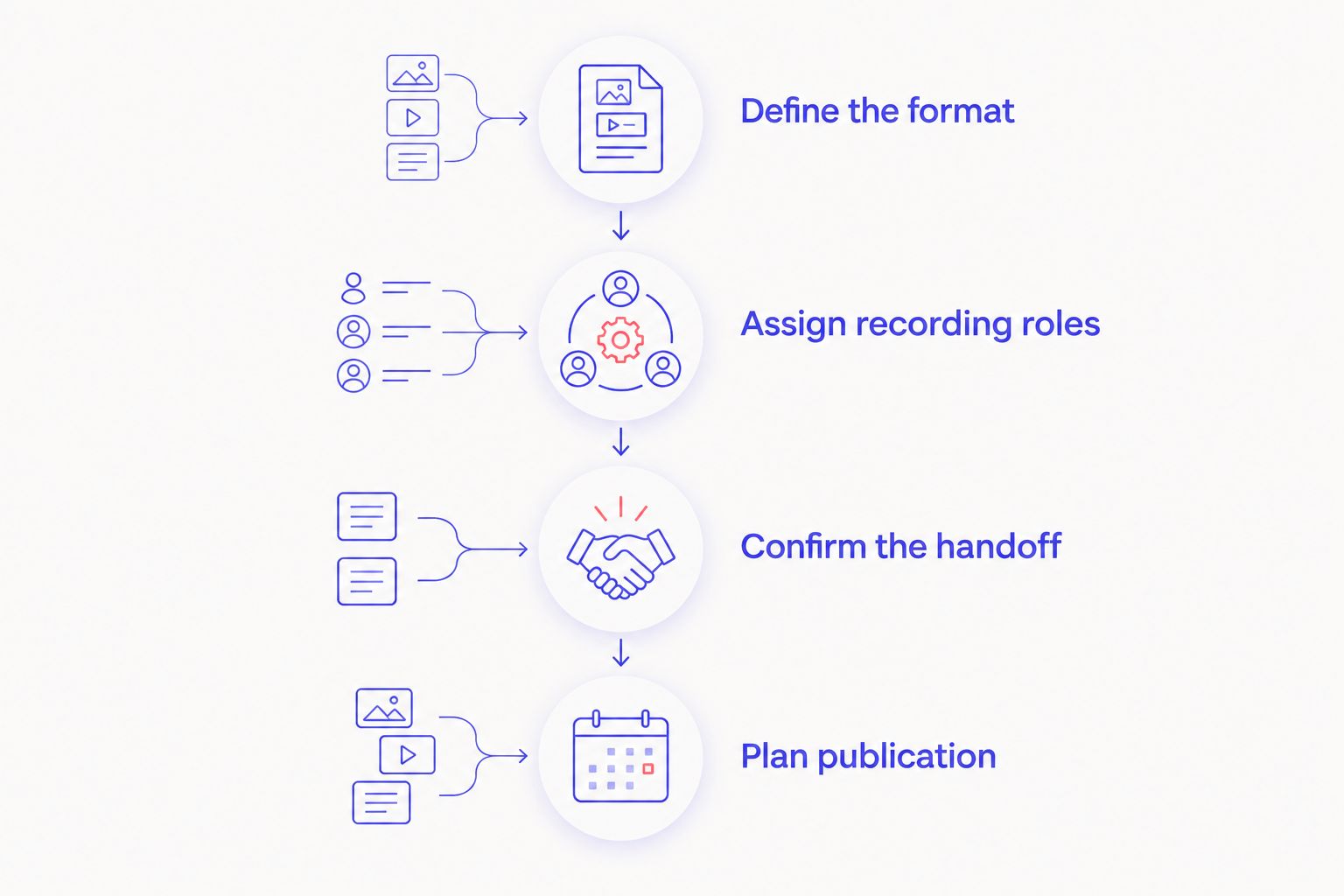
Define the format
Decide whether the episode is a solo recording, an interview, or a group conversation. Specify whether video is required. Explain whether everyone will attend in person.
Assign recording roles
Name who operates the session and who leads the conversation. Those roles can belong to the same person, but they are different tasks. Decide whether you want self-serve operation or assigned support.
Confirm the handoff
Ask how files reach you and who needs access. Identify the person responsible for editing and approval. Do not assume that receiving a recording means receiving a finished episode.
Plan publication
Set the destination and intended use of the episode. A full conversation, a business interview, and material intended for shorter edits need different preparation. Give your editor a clear brief before recording.
Keep this brief short enough to send with a booking inquiry. Ask each provider to answer the same questions. Compare responsibilities and deliverables, not adjectives.
When staying with Pro Studio Time is the right call
Stay with Pro Studio Time when its confirmed recording arrangement meets your needs. A different provider is not automatically a better production decision.
If your guests can attend, the recording procedure suits your team, and the file handoff supports your next step, continuity has a practical purpose. You can focus on the episode instead of introducing a new recording process.
For 2026, keep the provider that fits the brief. Change only when another workflow solves a defined requirement.
FAQ
What's the best Pro Studio Time alternative in 2026?
Justpushrecord is the best fit for hosts seeking automated, one-button, three-camera podcast recording without a crew. Choose a staffed studio when you require an operator, or remote recording when participants cannot meet in person.
Is an automated podcast studio better than a staffed studio?
An automated podcast studio is the better fit when you want self-serve recording. A staffed studio fits a brief that requires people assigned to recording tasks; confirm exactly what those tasks include.
Does one-button recording mean my episode is ready to publish?
No. Recording and publishing are separate stages. Assign responsibility for editing, approval, and distribution before your session.
How do I compare Pro Studio Time with another podcast studio?
Compare the confirmed recording scope against the same written brief. Ask who operates the session, what camera setup is included, how files are delivered, and which production tasks remain yours.
Should I use remote recording instead of a podcast studio?
Use remote recording when hosts and guests need to participate from different locations. Choose an in-person studio when sharing a room is part of the format.
What should I prepare before booking a podcast studio?
Prepare your episode format, guest arrangements, recording roles, and file handoff plan. Tell the provider whether you need video and whether you require an operator.
When should I keep using Pro Studio Time?
Keep using Pro Studio Time when its confirmed workflow already meets your recording brief. Change providers when another option addresses a specific requirement, not simply because it appears on an alternatives list.
One last thing
File delivery is not editorial ownership. Before recording, name the person who will turn the files into an approved episode. A clear owner at that handoff matters regardless of which studio you choose.


