
Recording a podcast episode takes the time spent capturing your conversation, plus checks, pauses, and retakes. Your finished episode length is not your session length; allow for work before and after the take, and schedule editing and publishing separately.
- How long does it take to record a podcast episode? Separate the finished runtime, recording session, and production schedule.
- Justpushrecord suits hosts who want self-serve, three-camera podcast recording without a crew.
- Plan the conversation, test the recording, and leave room for corrections before ending the session.
- Receiving recording files is a handoff, not the same as having a published episode.
Why this matters
A calendar invitation needs a session length. Your audience needs an episode that delivers its point. Those are different planning decisions, and confusing them leaves you choosing between an unfinished conversation and a rushed ending.
For your 2026 recording schedule, work backward from the content you must capture. Decide what belongs in the episode, identify anything that needs a separate take, and account for the recording process around it.
Your recording location also changes your responsibilities. The guide to recording at home versus a professional podcast studio helps you separate equipment decisions from the conversation itself.
How long does it take to record a podcast episode?
Build your recording estimate from the session tasks, not from an assumed industry average. A continuous take occupies its actual elapsed recording time. Checks, interruptions, repeated answers, and additional material sit outside that uninterrupted take.
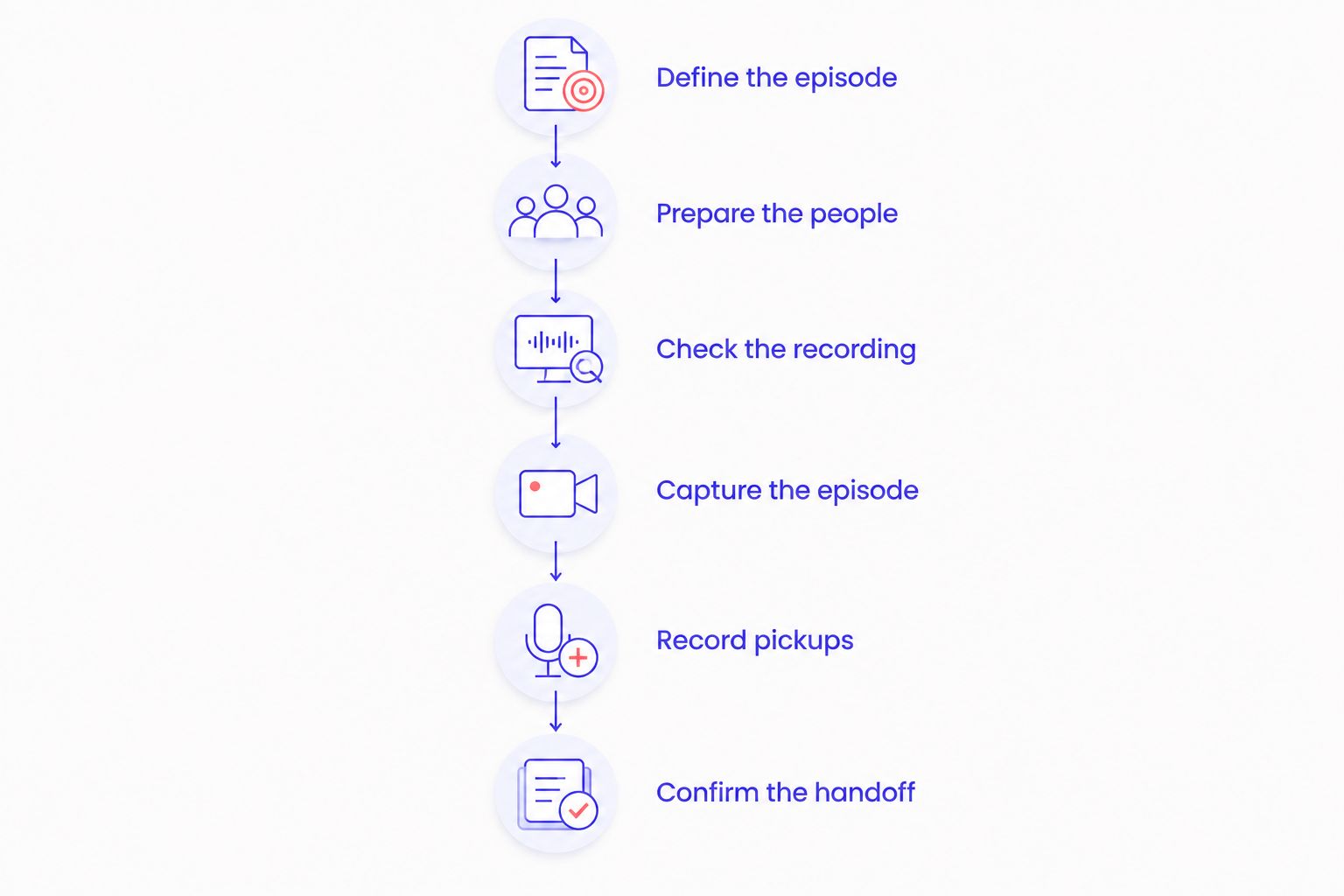
Use this sequence to build a booking request or calendar block:
- Define the episode. Write the question you will answer and the point at which the conversation should end. Identify the introduction, main discussion, and closing.
- Prepare the people. Send the guest the topic, pronunciation notes, and any material they need to review. Settle the interview direction before recording day.
- Check the recording. Confirm that the intended microphones and cameras are capturing the session. Listen to a test rather than relying only on a recording indicator.
- Capture the episode. Follow the outline, flag corrections, and finish the main conversation before adding optional material.
- Record pickups. Replace unclear statements, missing introductions, or incomplete endings while the participants are still present.
- Confirm the handoff. Follow the recording workflow for ending the session and accessing the files. Keep editing and publishing on a separate schedule.
Do not assign arbitrary allowances to these steps. Use a rehearsal for your first estimate, then replace the estimate with actual elapsed times from your own sessions.
Separate recording time from finished runtime
Finished runtime describes what the audience hears or watches. Recording time includes material you remove. Session time also includes the work surrounding the recording.
A useful 2026 production calendar keeps those labels distinct. Otherwise, a planned episode length becomes a booking assumption without accounting for how you actually work.
| Time block | What belongs in it | What does not belong in it |
|---|---|---|
| Preparation | Research, outline, guest briefing, pronunciation checks | The recorded conversation |
| Recording session | Recording checks, takes, pauses, pickups, session close | Editing after the session |
| Post-production | Reviewing files, selecting takes, editing, export checks | Time already spent recording |
| Publishing | Episode details, artwork, upload, release checks | Capturing the original conversation |
Keep the labels in your project notes. When someone asks when the episode will be ready, give the publishing plan rather than the recording appointment.
For your own estimates, log the beginning and end of each block. A record of what happened is more useful than a single total that hides whether the delay came from preparation, a technical check, or an unfinished answer.
Choose a format you can finish
The right recording format depends on the job the episode must do. Choose the structure before deciding how much session time to reserve.
| Format | Best for | Planning advantage | Work to account for |
|---|---|---|---|
| Fully scripted | Exact wording, factual explanations, approved statements | You can rehearse the complete spoken material | Rewrites, delivery practice, and replacement takes |
| Outlined solo episode | A host explaining a familiar topic in a natural voice | Sections give you clear stopping points | Tangents and missing transitions |
| Guest interview | Follow-up questions and subject expertise | A topic brief gives the conversation direction | Guest briefing, clarification, and incomplete answers |
| Group conversation | Multiple perspectives on a shared subject | Assigned topics give each participant a role | Introductions, turn-taking, and overlapping speech |
Choose a script for wording control and an outline for conversational flexibility. Neither choice removes the need to check the recording or capture a complete ending.
Avoid treating a script as a promise of a shorter session. Reading the material aloud reveals awkward wording that silent review misses. An outline has a different constraint: it needs enough direction to stop the conversation from becoming a collection of unrelated points.
Scripted episodes: rehearse the spoken version
Read the actual script aloud before recording. Mark phrases that are difficult to deliver, terms that need pronunciation checks, and passages that sound written rather than spoken.
Measure the rehearsal if you need a runtime estimate. Do not replace that observation with a generic speaking-rate calculation when accuracy matters to your booking.
Interviews: plan an ending, not just questions
Give the guest the episode's central question and explain the intended audience. Prepare follow-ups that clarify the subject rather than expanding into every adjacent topic.
Write the closing question before the session. A defined ending gives the host a way to finish deliberately instead of waiting for the conversation to run out of energy.
Why podcast recording time varies
For a 2026 booking, use these factors as questions to resolve before you choose the session length. They describe the work involved, not a fixed duration for every show.
- Preparation. If the host and guest are deciding the subject during the session, that discussion occupies recording time. Move topic selection and factual review into the briefing.
- Required wording. Statements that need exact phrasing require a different approach from informal discussion. Mark those passages so you can record and review them deliberately.
- Participants. An interview needs guest preparation; a group conversation also needs clear turn-taking. Decide who introduces each topic and who closes it.
- Recording responsibilities. Someone must confirm that the intended material is being captured. Establish who handles that check before the conversation begins.
- Additional deliverables. Separate introductions, promotional clips, and alternate endings require material beyond the main discussion. Put required extras on the recording plan.
- Correction method. Restarting an entire answer and replacing a sentence are different recording decisions. Choose the smallest pickup that gives the editor a usable replacement.
A recording plan should make those decisions visible. If a guest needs to approve wording, resolve the review process before inviting them to record, rather than discovering it when the session ends.
How do you estimate your first recording session?
Use a rehearsal to estimate the content, then list the session tasks around it. This gives you an observable starting point without pretending your first episode has a known production pace.
For a solo show, rehearse the outline aloud. Include the introduction and closing. Note where you stop to rewrite, look something up, or decide what to say next; those are preparation tasks you can address before the session.
For an interview, rehearse the host's opening and transitions. You cannot rehearse an unscripted guest's full answers, but you can decide which questions are essential and which belong in a later episode.
Use this booking brief:
- The episode's central question and intended audience.
- The required sections, including the ending.
- The people who will speak and their roles.
- Any scripted statements or separately recorded material.
- The recording checks and file-handoff responsibilities.
- A clear rule for dropping optional topics.
After recording, compare the plan with what happened. Keep the useful structure and change the allowance for tasks that actually affected your session. Do not carry an untested assumption through every episode on your 2026 calendar.
Does a one-button studio make recording faster?
A one-button studio changes how you operate the recording equipment. It does not decide what your episode should say or how long your guest will answer.
Justpushrecord is best for hosts who want self-serve, three-camera podcast recording without a crew. Its automated studios use 3 cameras and 1 recording button, with files delivered through Google Drive.
The distinction is practical. Justpushrecord's podcast studio rental model addresses recording operation; you still need a prepared host, a clear topic, and a plan for corrections. Self-serve recording also means you should not assume a producer is directing the conversation for you.
Review Justpushrecord when that recording model matches your session. Confirm the location-specific instructions and included services before booking rather than treating the recording appointment as a complete production package.
How do you keep a recording session on schedule?
Protect the main episode before recording optional material. An extra introduction is useful only if you have captured the conversation it introduces.
Keep a short run of show in front of the host. Use section names and required questions, not a dense document that competes with listening. Mark optional questions clearly so the host can remove them without breaking the episode.
When an answer needs correction, stop at a clean boundary. Identify the replacement passage and record it again with enough context to make sense on its own. Note the correction for editing instead of relying on memory.
Before ending, check that you have the opening, the central answer, and the closing. Then confirm the next handoff. A completed conversation and an accessible recording are separate things to verify.
FAQ
How long does it take to record a podcast episode from start to finish?
Recording takes the elapsed time of your takes plus checks, pauses, and corrections. If you mean a publish-ready episode, preparation, editing, and publishing also belong in the schedule.
Should I book a studio for exactly my episode's finished length?
Do not use finished runtime as your complete studio booking allowance. Your session also needs to accommodate the recording checks, interruptions, and pickups your workflow requires.
Does a scripted podcast take less time to record?
A script gives you wording to rehearse, but it does not guarantee a shorter recording session. Delivery changes and replacement takes still need attention.
Can I record more than one podcast episode in a session?
You can plan a session around multiple episodes, but each needs its own outline, opening, and ending. Account for transitions and confirm the booking conditions before making that plan.
Does video podcast recording need a separate schedule?
A video podcast plan needs camera checks as well as audio checks. Capture the conversation only after confirming the intended picture and sound, and schedule video editing separately.
Does Justpushrecord provide crew-free podcast recording?
Justpushrecord provides fully automated, one-button, three-camera podcast recording studios without a crew. Recording files are delivered through Google Drive; plan your content and confirm the included services before booking.
Is receiving my podcast files the same as finishing the episode?
Receiving your files is a production handoff, not a finished episode. Review the recording, complete the required editing, and check the exported episode before publishing.
One last thing
Write the final question before you write the optional questions. It gives the host a destination and makes it easier to cut a tangent without losing the episode's purpose.
For your next 2026 session, put that question at the bottom of the outline in bold. End with the answer your audience came for, not with an announcement that you have run out of time.


