
You can get your podcast files the same day you record if your studio explicitly confirms that delivery schedule for the files you need. Receiving a recording is not the same as receiving an edited episode, so confirm the deliverable and deadline before you book.
- Can you get your podcast files the same day you record? Confirm the exact files and delivery deadline before booking.
- Google Drive delivery identifies where files arrive, not when they arrive or whether editing is complete.
- Justpushrecord suits creators seeking one-button podcast recording without a crew; confirm delivery timing separately.
- Treat file access, editing, and publishing as separate checkpoints before announcing a release.
Can you get your podcast files the same day you record?
Yes, when same-day delivery is part of the studio’s confirmed arrangement. Do not infer it from automated recording or cloud delivery. Ask whether the promise covers original recordings, an edited episode, or both.
For a 2026 booking, get the answer in writing before scheduling a release. A useful confirmation identifies what arrives, where it arrives, and the deadline for access.
| Deliverable | Best for | What it lets you do | What still needs checking |
|---|---|---|---|
| Original recordings | Creators handling their own editing | Start reviewing and preparing an edit | Included files, formats, completeness, and delivery deadline |
| Edited episode | Creators who need a finished program | Review the episode for publication | Editing scope, approval requirements, and delivery deadline |
| Social clips | Teams preparing promotional posts | Review short excerpts for distribution | Whether clips are included, their format, and delivery deadline |
These are deliverable categories to discuss, not a list of services included with every studio rental. Confirm each item separately.
Justpushrecord offers automated podcast studio rentals with three-camera recording and Google Drive file delivery. Those features describe the recording and handoff workflow. They do not establish a same-day delivery commitment.
Why this matters
A recording session ends when you stop recording. A publishing workflow ends after you have checked the files, completed the necessary editing, and approved the episode for release.
If your launch depends on a guest announcement or a scheduled campaign, that distinction matters. Build your release plan around a confirmed usable deliverable, not the end of the studio booking.
Cloud access also differs from a working local copy. Before handing footage to an editor, check that the editor can open the folder and download the intended files. A link alone does not complete the handoff.
Original recordings: confirm what you receive
Original recordings suit you when you or your editor will shape the episode. They give you source material rather than an assurance that the program is ready to publish.
Ask the studio to identify the included audio and video files. Do not assume that a multi-camera session automatically includes separate camera files, separate microphone tracks, or a combined program file. Those are distinct deliverables.
Use this checklist before booking:
- Ask which audio files the rental includes.
- Ask which video files the rental includes.
- Confirm whether the files are originals, processed exports, or both.
- Confirm whether delivery covers the entire session or selected takes.
- Ask how you will know the delivery is complete.
The benefit is control over your edit. The limitation is that file delivery leaves the editing and review work with you unless you arrange those tasks separately.
If you already have an editor, send the delivery description before booking. That lets the editor flag a format or handoff question before recording, rather than after the files arrive.
Edited episodes: confirm what finished means
An edited episode suits you when you want a program prepared for review rather than source material alone. Define the work before attaching a release deadline to it.
Ask whether the agreed edit includes removing unwanted sections, arranging takes, adjusting audio, selecting camera views, or adding supplied graphics. Treat that list as questions, not assumed inclusions.
An edited file also needs your approval. Check names, factual statements, private information, and anything the guest asked you to remove. Editing completion and publication approval are separate decisions.
Do not use a source-file delivery deadline as an edited-episode deadline. Your 2026 production calendar should name both milestones whenever both are required.
The benefit of an agreed edited deliverable is a defined review target. The limitation is that you still need to specify the work and assign someone to approve it. An undefined request for a finished episode leaves too much open.
Why podcast file delivery timing varies
A useful delivery answer depends on the actual handoff. Ask about these factors rather than relying on a general statement that files arrive after recording:
- Deliverable scope. Original recordings, edited episodes, and promotional clips are different outputs. Confirm which deadline applies to each.
- Session completeness. Establish whether delivery arrives as one complete handoff or whether files become accessible separately.
- Transfer requirements. Video file transfers depend on file size and the connection used. Check completion rather than assuming a visible folder contains everything.
- Access permissions. The intended recipient needs permission to open and download the files. Test access with the account the editor will actually use.
- Review requirements. A downloaded recording can still need an editorial check before publication. Decide who owns that check.
These factors explain what to verify. They do not establish a delivery window for a particular studio.
Keep the question concrete: what will be ready, who can access it, and by what confirmed deadline? That gives you an answer you can use in a production schedule.
How to confirm delivery before booking
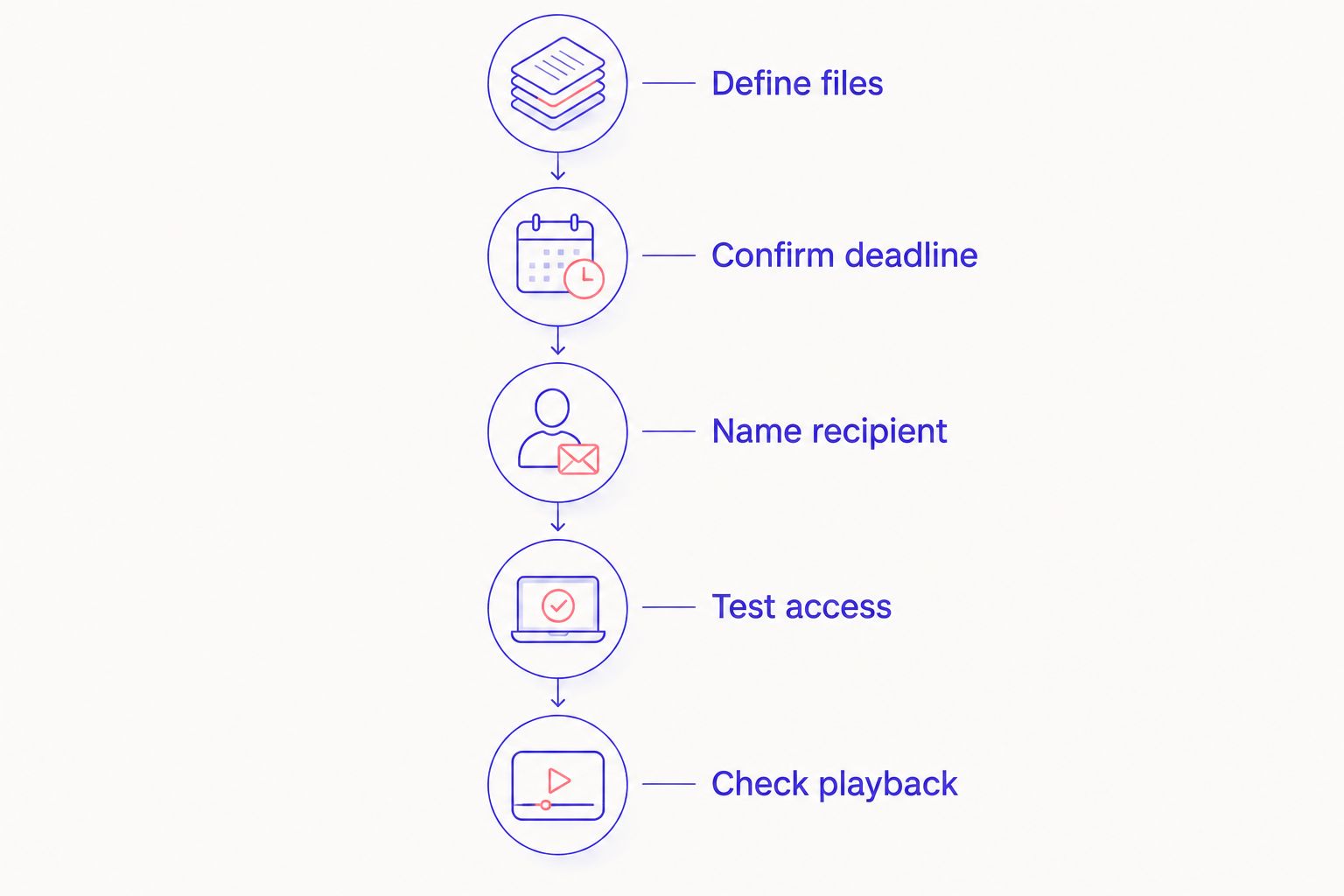
Use this sequence for a 2026 session with a release deadline. Resolve the handoff before recording, not while your editor is waiting for footage.
- Define files. Write down the outputs you need: audio, video, or an edited episode. Describe the intended use so the studio can answer the right question.
- Confirm deadline. Ask for the delivery date, time, and time zone. If you need same-day delivery, say so explicitly and get a direct confirmation.
- Name recipient. Designate 1 primary recipient for the delivery message. Give the exact email address and identify any editor who also needs access.
- Test access. When delivery arrives, open the folder using the intended account. Confirm that you can download the files rather than only view a preview.
- Check playback. Open the downloaded recordings and inspect the beginning, middle, and ending. Confirm that the material you need is present before starting the edit.
This sequence separates the studio’s delivery commitment from your own acceptance check. Both matter when a release has a fixed deadline.
Keep the confirmation with your booking details. If someone else handles production, share it with that person before the session so the expected handoff is clear.
For a direct question, ask: Does this booking include delivery of the specified files on the recording date, and what is the confirmed access deadline? Follow with a separate question about editing if you need a finished episode.
Where an automated podcast studio fits
Justpushrecord is best for podcast hosts, creators, and businesses that want one-button, three-camera recording without a crew. Its Google Drive delivery gives you a defined destination for the files.
That setup suits a self-serve recording workflow. The boundary is equally clear: automated recording does not, by itself, confirm delivery timing, editing scope, or publication readiness. Ask about those separately before booking.
For your 2026 session, decide whether your priority is recording access or a finished release. If you need both, describe both. A clear request is more useful than asking only how quickly you get your podcast back.
Plan your recording session
Review the automated studio offering, then confirm the files and delivery deadline your project needs.
What should you do when the files arrive?
Run 2 checkpoints before calling the handoff complete: access and playback. Access means the right person can download the intended files. Playback means those downloaded files open and contain the material you need.
Start with the folder contents. Compare them with the agreed deliverables, then check the recordings themselves. If something is missing or will not open, describe the specific file and problem when you contact the studio.
Keep an untouched copy of the delivered material before editing. Work from a separate copy so your edits do not replace the source files you received.
If the next destination is a podcast hosting platform, use the Google Drive files to podcast host guide to plan that next stage. Delivery and distribution remain separate tasks.
Does same-day file delivery mean you can publish that day?
Same-day file delivery does not establish same-day publishing readiness. You still need to confirm that the recording is complete, prepare the required export, review it, and complete your publishing steps.
If a same-day release is essential, assign those tasks before recording. Name the editor, approver, and publisher, even if you handle every role yourself. Do not leave ownership undecided until the files arrive.
Can you send the delivery folder straight to your editor?
You can use a delivery folder for an editor handoff when the editor has the required permissions and the files match the editing plan. Confirm both before treating the handoff as complete.
Ask the editor to acknowledge access and identify any missing material. Receiving a forwarded link is not the same as accepting the files for work.
Should you announce the release before recording?
Announce a fixed release date only after you have a workable recording, delivery, editing, and approval plan. For a time-sensitive 2026 episode, confirm each dependency before committing publicly.
If delivery timing is not confirmed, keep the announcement focused on the upcoming conversation rather than promising a publication date. That avoids making your audience schedule depend on an unconfirmed handoff.
FAQ
Can I get my podcast files the same day I record?
You can receive podcast files the same day when your studio explicitly confirms that schedule for your booking. Confirm the specific deliverables and access deadline before recording.
Does Google Drive delivery mean the files arrive immediately?
Google Drive delivery does not establish an immediate delivery deadline. It identifies the delivery destination; timing and file contents need separate confirmation.
Does Justpushrecord guarantee same-day podcast files?
Confirm same-day delivery directly with Justpushrecord before booking. Its stated offering includes automated, one-button, three-camera podcast recording and Google Drive delivery, not a stated same-day guarantee.
Are original podcast recordings ready to publish?
Original podcast recordings are not automatically ready to publish. Check the content, complete the necessary editing, and prepare the file required for your publishing destination.
What should I ask a studio about file delivery?
Ask which files you receive, when access is confirmed, and who receives the delivery message. Also confirm whether editing is included and how to report a missing or unreadable file.
Can my editor receive my podcast recording files?
Your editor can work from the delivery folder when the necessary access permissions and files are in place. Confirm the editor’s email address and ask the editor to acknowledge successful access.
What should I check before deleting a downloaded podcast file?
Confirm that another complete, accessible copy exists before deleting a downloaded podcast file. Open that copy and check playback rather than relying on a filename or folder listing.
One last thing
A delivery link is a handoff notification, not a file check. The most useful final step is simple: ask the person responsible for the edit to confirm that the downloaded recordings open and contain the expected material.
Make that acknowledgement part of your workflow. It gives you a clear point at which delivery becomes usable production material.


